
Overview
If you’ve ever downloaded Telegram from APKPure, your phone may be quietly uploading your chat logs, photos, contacts and location to an attacker’s server
Security researcher Eric Parker decompiled the Telegram 12.6.5 installer on APKPure and found a spyware framework called DataCollector injected into it. The attack chain is complete and the code is professional — a textbook third-party app store supply chain attack
How the attack works
1. Re-signing and repackaging
The attacker obtained the official Telegram APK, replaced its original signature, and injected malicious code into it. In appearance and functionality this app is identical to genuine Telegram; an ordinary user can’t spot anything wrong
The malicious code was packaged separately into the classes3.dex file. Genuine Telegram only has classes.dex and classes2.dex; this extra file is where the backdoor hides, and it has over 3,000 lines of code
2. Calling internal APIs
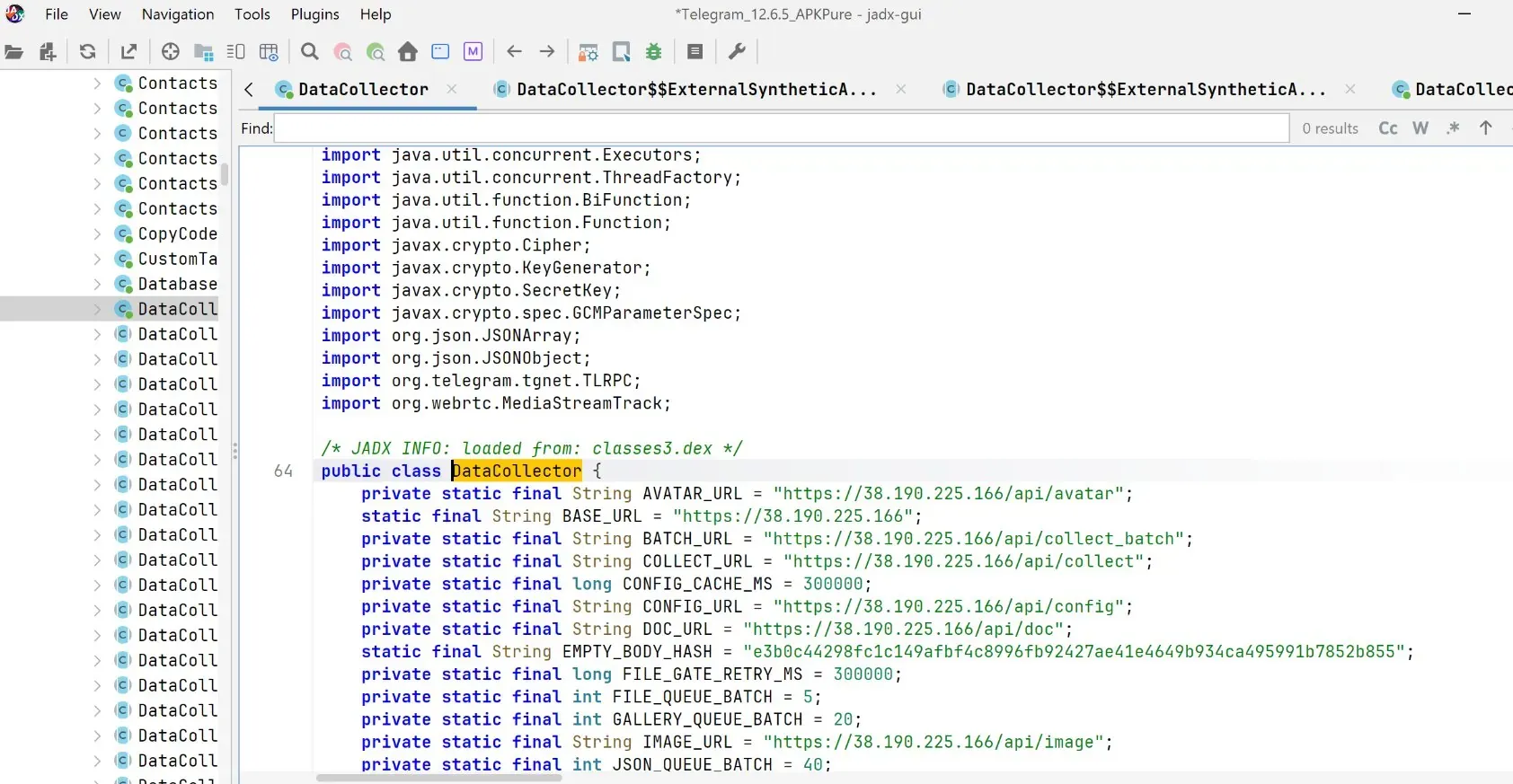
The JADX decompilation screenshot shows the DataCollector class importing:
org.telegram.tgnet.TLRPCThis is Telegram’s internal network protocol library. That means the spyware framework doesn’t brute-force data from outside; it calls Telegram’s own interfaces directly to obtain chat logs, including historical messages, bypassing permission checks
3. Encrypt, then upload
The code also imports:
javax.crypto.Cipherjavax.crypto.KeyGeneratorjavax.crypto.SecretKeyjavax.crypto.spec.GCMParameterSpecThis combination corresponds exactly to the AES-GCM encryption scheme. Stolen data is encrypted locally before being uploaded to the C2 server, in order to slip past network traffic inspection tools
The C2 server’s full endpoint list
The decompiled code hardcodes the following server endpoints, all pointing to 38.190.225.166:
/api/config— receives configuration commands sent down by the attacker/api/collect— uploads data collected in real time/api/collect_batch— batch uploads data/api/avatar— uploads avatars/profile information/api/image— uploads gallery images/api/doc— uploads document files
Two details in the code are also worth noting: GALLERY_QUEUE_BATCH = 20 means the gallery uploads 20 images per batch, and FILE_GATE_RETRY_MS = 300000 means a failed upload is retried every 5 minutes. This is a carefully designed exfiltration system, not a hastily written proof of concept
What it can steal
Based on the code structure and endpoint analysis, DataCollector has the following exfiltration capabilities:
Communications data
- All Telegram chat logs, including historical messages
- Contact names and numbers
Files and media
- All images in the phone’s gallery
- Document files in phone storage (Word, PDF, etc.)
Device information
- Real-time GPS location
- SIM card information (carrier, phone number)
- Device model and OS version
Why APKPure didn’t catch it
APKPure’s official website claims all apps are scanned by VirusTotal. But this attack got past at least two lines of defense:
Bypassing signature verification: APKPure verifies whether the file has been tampered with, but it doesn’t verify that the signature matches the official one on Google Play. Re-signing is technically legitimate, but it’s no longer the original
Bypassing virus scanning: DataCollector only uses legitimate Android APIs (crypto libraries, file reads, network requests) and contains no exploit or vulnerability code at all; its behavior is no different from an ordinary data-sync app, so traditional antivirus engines struggle to identify it
This is also why a similar variant Dr.Web found (Android.Backdoor.Baohuo) could survive on APKPure and infect over 58,000 devices
Have I been hit? How to tell
The simplest way to check: open your phone’s app list and look at Telegram’s signature information
Genuine Telegram’s (from Google Play) signature fingerprint (SHA-256) should be verifiable on the Google Play developer page. If you can’t confirm it, I recommend assuming the worst — that you’ve been hit — and handling it as follows
Actions to take immediately
Step one: Uninstall Immediately uninstall Telegram from an unknown source
Step two: Reinstall the genuine version Only download from Google Play or Telegram’s official site (telegram.org)
Step three: Audit active sessions Open the newly installed Telegram → Settings → Privacy and Security → Active Sessions, and terminate any device login you don’t recognize
Step four: Change your password + enable two-step verification Two-step verification prevents attackers from using a stolen session to log into your account
Step five: Tell your contacts If your chat logs have leaked, your contacts’ information may have been collected along with them
The lesson we never remember
The core problem in this incident isn’t that Telegram itself has a vulnerability, but that third-party APK distribution channels lack trustworthy integrity guarantees
Google Play’s signature verification mechanism is imperfect, but at least it ensures that what you download is the version the developer uploaded with their own hands. Platforms like APKPure are essentially middlemen, and every link in a middleman’s chain is an attack surface
In regions where Google Play is inaccessible, if you must use a third-party channel, I recommend:
- Downloading directly from the developer’s official site (Telegram’s official site provides direct links)
- Manually verifying the SHA-256 hash after downloading
Conclusion
Supply chain attacks are dangerous precisely because they attack trust itself. You think you’re using a genuine app, but every five minutes your photos and chat logs are quietly flying off to a strange server
Sources: Eric Parker’s reverse-engineering analysis (X/Twitter), Dr.Web’s security report, the MalwareBazaar sample repository
