
0. Introduction
I’m sure everyone who has messed with transparent proxy modules on a rooted phone has run into this very thorny problem:
Mobile data works perfectly fine, but you can’t place or receive calls, and sending/receiving texts is broken too
Your first instinct is a signal problem, but you’ll usually find the signal is at full bars. This is actually a classic issue caused by a conflict between proxy software and the system’s low-level VoLTE service.
1. Problem Analysis
Here’s how HD calling works today
On LTE/NR networks, calls and texts don’t go over the traditional circuit-switched network; they rely on the
IMSservice, and theVoLTEwe’re all familiar with is its most common application
The IMS service itself also communicates with the carrier’s core network through IP packets. Transparent proxy modules like Surfing, in order to achieve global proxying, have their default TUN mode create a virtual network interface at the system level, forcibly taking over almost all network traffic on the device.
Once VoLTE/IMS signaling traffic is also taken over by this virtual interface, these packets — extremely sensitive to latency and routing — get wrongly proxied, redirected or split, which leads to IMS service registration failure or constant disconnects and makes calls impossible
It’s not a signal problem — VoLTE signaling is being hijacked by the transparent proxy
2. Solutions
Essentially, this means letting the traffic of the call-related core services bypass the transparent proxy and talk directly to the carrier network
CAUTIONWatch the indentation!
YAML is extremely, extremely strict about indentation — one space too few or too many and the whole thing blows up. Give it an extra space and it will go off on you
2.1 Solution One: Samsung users should try this first
This is the simplest and most direct method: have the proxy exclude the affected apps
List of package names to exclude (mainly for Samsung OneUI):
com.qti.qcc # 高通IMS/VoLTE 调度核心com.sec.imsservice # 三星IMS服务(VOLTE/VoWiFi)com.sec.epdg # VoWiFi ePDG隧道服务com.samsung.android.messaging # 系统官方短信com.samsung.android.dialer # 拨号器com.samsung.android.incallui # 通话界面com.samsung.android.app.telephonyui # 通话UI资源com.samsung.android.smartcallprovider # 来电识别com.samsung.android.intellivoiceservice # 智能语音降噪com.android.settings(Note: on non-Samsung phones, you can try excluding native IMS service package names such as com.android.imsservice according to your own situation)
2.1.1 Procedure (using Surfing as an example)
- Using a tool like MT 管理器, open the Clash config file, usually located at:
/data/adb/modules/box4magisk/config.yaml. - Find the
tun:->exclude-package:section (around lines 137–146) - Uncomment the
#in front of these package names, as shown below - Save the config file, then reboot
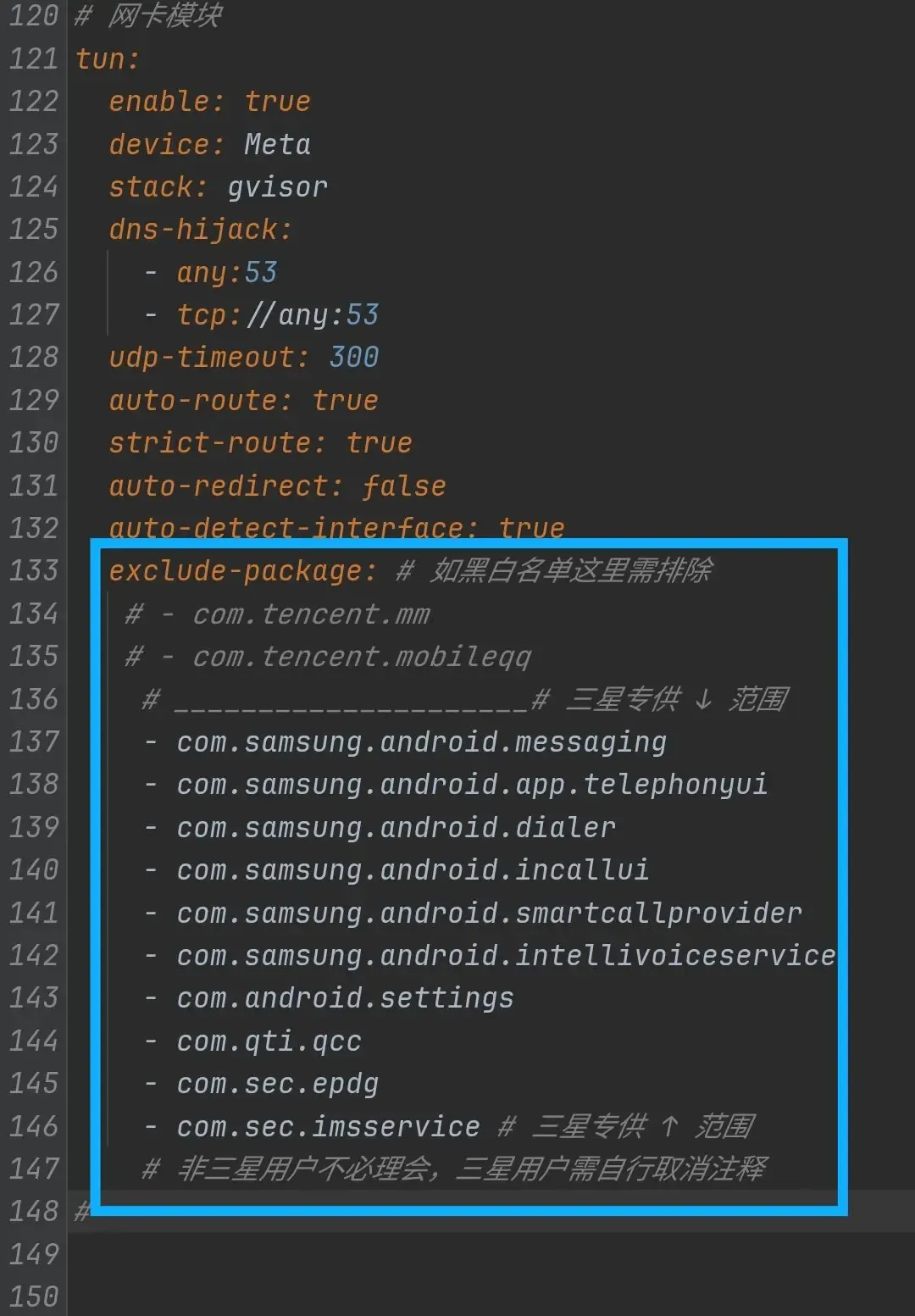
This method works on most Samsung phones. If the problem persists after doing this, or your phone isn’t a Samsung but you’re hitting the same issue, just go straight to Solution Two
2.2 Solution Two: Switch to Tproxy
If Solution One doesn’t work, or you want a more stable and thorough fix, then switching the proxy mode from TUN to Tproxy is the best choice — it’s definitely the most universal solution
2.2.1 Why Tproxy?
TUNmode is an application-layer approach, which you can think of as taking over everything wholesale; the exclusion approach isn’t always thorough enough — loosely speaking, you can think of it as the VPN-style total takeoverTproxymode works withiptablesat the lower kernel level, enabling more precise traffic control. The module usually comes with preset rules that bypass the system’s internal and carrier communication traffic from the start, proxying only user app traffic, avoiding the conflict at its root- What’s more, Surfing uses the Mihomo core. If you really want to play with TUN, I’d suggest sing-box — the latter has better optimizations for TUN, and you could call it the ceiling of the proxy industry
2.2.2 The actual steps
Modify the Clash config file and enable the Tproxy listener
- Open
/data/adb/modules/box4magisk/config.yaml. - Turn off TUN
PRTCL // YAMLtun:enable: false #把这里改成false# ... 其他设置保持不变
- Enable Tproxy by adding the following between the TUN and DNS sections
PRTCL // YAMLtproxy:enable: trueport: 1536 # 注意:此端口号必须与 tproxy-port 和模块脚本使用的端口一致,Surfing默认1536,视你的配置跟随变动,端口在文件顶部的`tproxy-port`
- Reboot
3. Conclusion
This post is mainly about providing a concrete solution. As for the proxy knowledge involved here, I can write a separate post about it later (digging another hole)
