
Disclaimer
caution
The content of this article is for technical research and study purposes only, intended to help developers and others gain a deeper understanding of how network proxies, traffic routing and similar mechanisms work. The author is not responsible for the consequences of any improper use. Commercial use is strictly prohibited.
You must ensure that all operations comply with the laws and regulations of your country or region. This article firmly opposes and condemns any use of network proxy technology to bypass legitimate network controls, access illegal content or engage in any illegal activity.
The operations covered in this article require modifying Android’s low-level system and carry potential risks (such as bricking the device, data loss, system instability, etc.). All operations are based on your voluntary choice and you bear all risks yourself. The author is not responsible for any device problems or legal disputes caused by following the steps in this article.
This article is aimed at users with sufficient background knowledge and risk awareness. Before trying anything, make sure you understand basic concepts such as root. If you don’t know what you’re doing, stop right now.
INTRO
Before we start, let’s briefly compare a conventional proxy with box4magisk.
CHIZI-0618/box4magisk
CLASH FOR ANDROID
Take the most common one, Clash for Android. It usually works by calling the VPN Service API provided by the Android system.
When you start the proxy in CFA (Clash For Android), the app asks the system to create a virtual VPN interface, which requires user authorization. Android then redirects traffic from almost every app on the device to this interface.
In essence CFA is just a shell for more convenient interaction with the user; the actual traffic processing is done by the Clash core.
The Clash core checks all passing traffic against the rules you configured, and decides where that traffic goes based on the rule match results.
BOX4MAGISK
box4magisk uses magisk/KernelSU/APatch to deploy Clash in data/adb/, deeply integrating it into Android’s network stack and achieving traffic interception with higher privileges.
Because it doesn’t rely on the VPN Service API, it doesn’t occupy a VPN slot at all, and by using a transparent proxy it can bypass most detection.
PRINCIPLE
TRANSPARENT PROXY
Transparent Proxy. Simply put, it makes the app unable to detect its existence, so the app believes it is connecting directly to the internet. Its interception is mainly implemented as follows.
TUN
A TUN device is a virtual network device implemented in software. Unlike eth0 or wlan0, it isn’t real hardware. It’s like a virtual Ethernet port, with one end plugged into the system’s network stack and the other into the Clash core.
Its working principle is mainly:
Following iptables rules, the system sends all network traffic that needs proxying to the TUN device. The Clash core reads these raw packets from the other end and processes them, after which they go back through TUN to the system kernel and out to the destination.
The TUN device works at the network layer, handling IP packets, which lets it take over all IP-based traffic.
TUN2SOCKS
As is well known, Clash generally listens on a SOCKS5/HTTP port, expecting data that conforms to the proxy protocol. But what the TUN hands over is raw network packets — not remotely the same thing.
TUN2SOCKS acts as the bridge between them, achieving a translation effect. It reads the raw packets coming from the TUN, packages them in the standard SOCKS5 protocol format as a client, and sends them to the Clash core, so Clash can process the traffic normally.
- To Clash, it is merely providing proxy service to a local client called
tun2socks, and it has no idea that the traffic it is handling comes from the entire system. - To the app, it believes it is connected directly to the internet, unaware that its traffic has been hijacked and translated by the TUN.
IPTABLES
By default, system traffic won’t just walk into the TUN by itself. Box4magisk uses iptables to steer traffic into the TUN.
Let’s first understand iptables. This is the built-in packet filtering and manipulation tool in Linux, but here its core role isn’t a firewall — it’s routing traffic.
On startup, Box4magisk adds a series of rules to REDIRECT or TProxy traffic to the TUN device.
Next, an example to better understand how traffic flows when they work together
- The app tries to connect to
xice.cx:443 iptablesimmediately intercepts this TCP request and, per the rules, directs the traffic to the TUN device- The TUN directs the traffic to
tun0 tun2socksreads this raw TCP request fromtun0, packages it into theSOCKS5protocol asCONNET blog.chongxo.us 443, and sends it to Clash’s port on localhost.- Clash receives the request and routes it out according to the proxy rules.
Data returned from the remote server goes back the same way in reverse.
PREREQUISITES
- An Android device with root access
- The Magisk module files
Here we’ll use Surfing for the demonstration. It’s a project forked from box4magisk, featuring an all-in-one integrated service that works as soon as you flash it.
You can also choose the original box4magisk and configure it yourself; Chongxi may write a blog about that later.
LET’S GO
- Install Surfing in Magisk; no need to reboot your device at this point.
- In
/data/adb/box_bll/clash/config.yaml, you can add yourremote proxy config URL.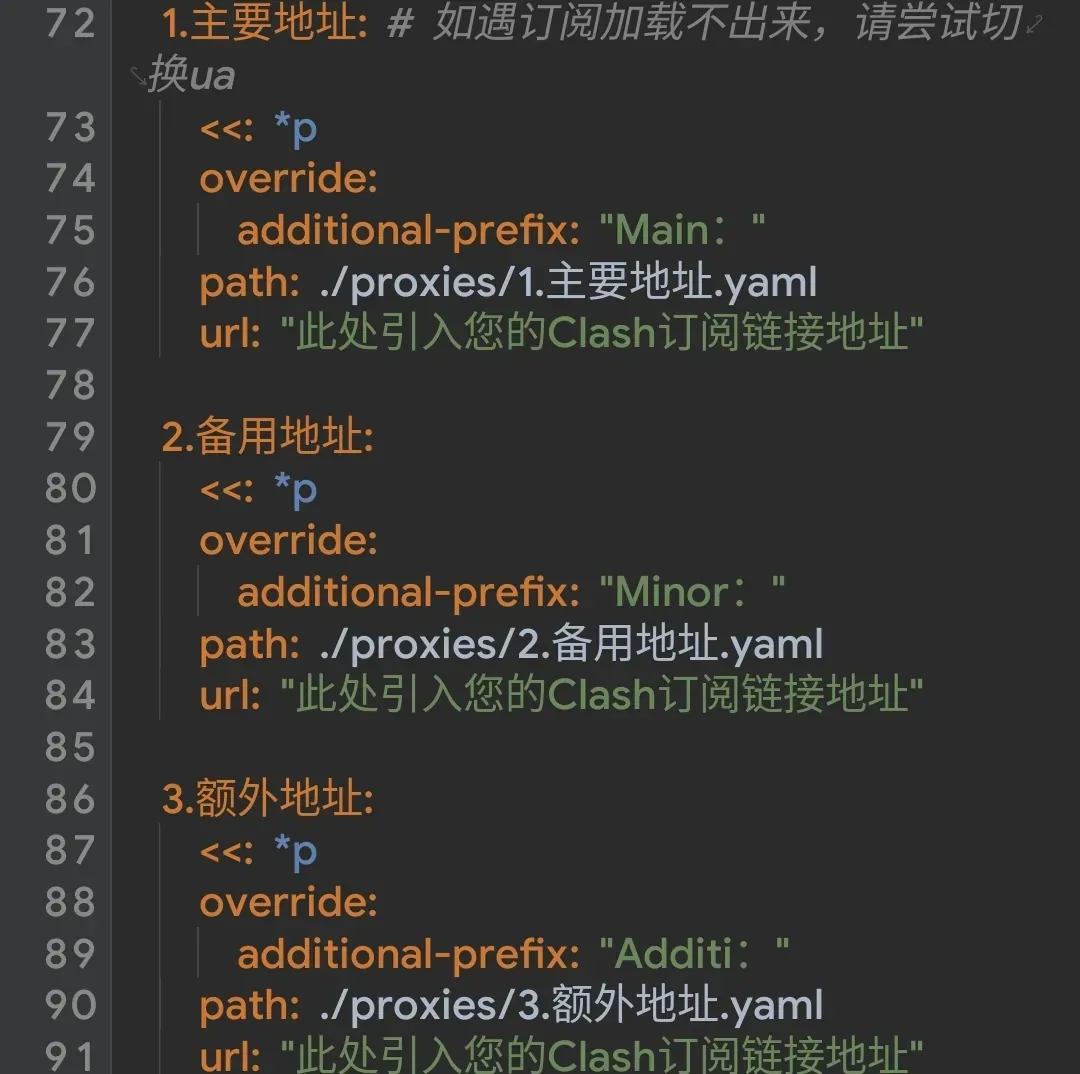 You can also modify the config yourself according to the comments inside; reboot your device after changing it.
 - Open your browser and go to
http://127.0.0.1:9090/ui/#/to open the WebUI console, where you can configure Surfing in detail.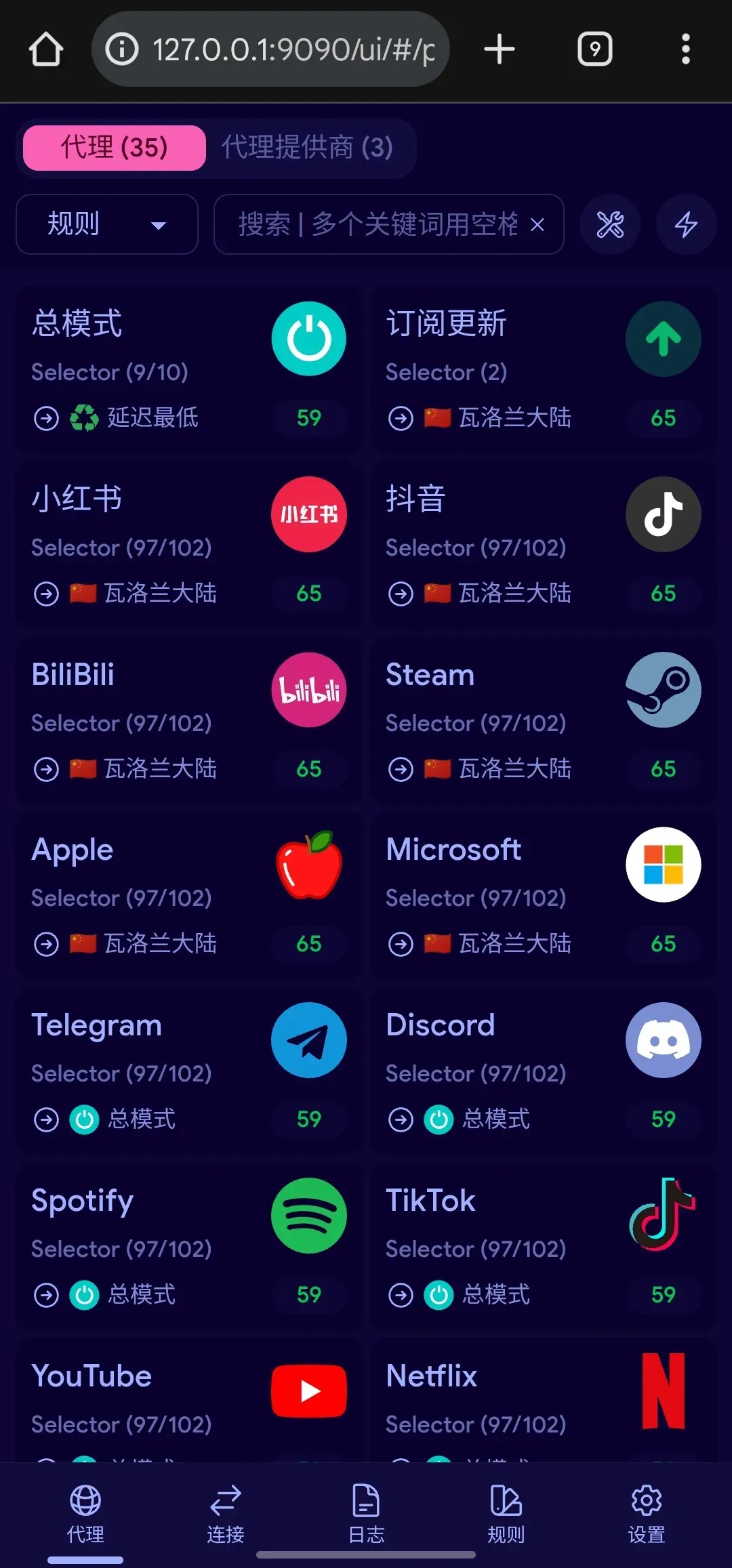
- Starting and stopping: turn off the Magisk module and it stops.
That completes the Surfing deployment.
CONCLUSION
And with that, through the Box4Magisk module, we’ve gone beyond the limits of ordinary apps, planting Clash deep in the system’s lower layers and achieving a truly global, seamless network proxy.
At the same time, we’ve gained a deep understanding of the working principles behind it, turning “magic” into controllable “technology”.
[center large](If you’re a Samsung user, check out this post::/2025/11/07/SurfingIssueOnSamsung/)
This is Chongxi, looking forward to seeing you next time
Thanks For Watching.
